
Schema Converter
XSDs are commonly used in TIBCO® projects to define the structure and data types of XML messages. However, in modern data processing environments, especially those leveraging Apache Kafka®, Avro is often preferred due to its compact binary format and schema evolution capabilities.
The Schema Converter converts XML Schema Definitions (XSD) into Apache Avro™ Schema format, ensuring efficient data serialization and interoperability across systems.
Post-Processing Steps
-
Click the Schema converter icon (labeled Schema / Schema ➜ Avro) to view results when processing completes.
-
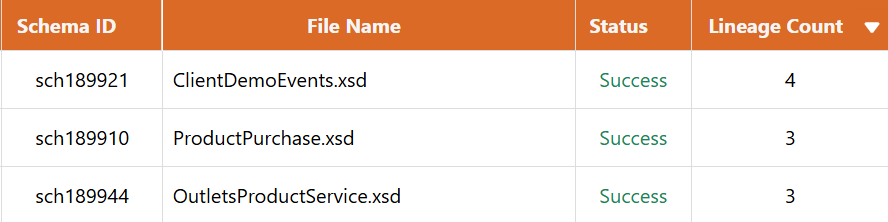
The next screen will list all the input XSD files from the project file and their conversion status.
-
Review Columns
Schema ID: Unique XSD file identifier.Is Root: Indicates if the XSD is a root schema.Lineage Count: Number of child XSDs referenced by the current XSD.Usage Count: Number of process files that reference the current XSD.Schema Location: File path or URL where the XSD is located in the project.
-
Actions
-
Download: Request download of the output files as a ZIP archive.
-
View: Allows you to see the XSD Content, Avro Schema, Lineage, and Usage sections.
Note: Empty files will not be included in the output for viewing or downloading.
-
Working with Output Files
File Types
- XSD: Input XML Schema Definition file (
.xsd) - Avro: Converted Avro Schema format (
.avsc)
Data Transfer Objects (DTOs)
The Schema Converter automatically generates Data Transfer Objects (DTOs) alongside the Avro Schema files. DTOs are language-specific classes that represent your schema structure, providing strongly-typed objects for working with your data in application code.
Generated Languages:
- Java: POJO classes with getters, setters, and serialization annotations
- Python: Classes with type hints and data class decorators
- C#: Classes with properties and .NET serialization attributes
DTOs bridge the gap between your schemas and application code, enabling type-safe data handling and eliminating the need to manually write data classes. They can be directly imported into your projects for deserializing Avro messages, performing operations, and serializing data back into Avro format.
Usage
-
The usage section displays all process files that reference the current XSD. This data can be downloaded as a
csvfile. -
This feature is particularly useful for identifying dependencies and understanding how the XSD is utilized within the project. By analyzing the usage information, users can make informed decisions about schema modifications and their potential impact on the overall system.
Lineage
-
The lineage feature provides a visual representation of the hierarchical relationships between a root XSD and its referenced child XSDs. This information is presented in a graphical user interface (GUI) and can also be downloaded as a
yamlfile for further analysis. -
This is displayed in a hierarchical format, with the root XSD at the top and its child XSDs indented below, allowing users to easily navigate and understand the schema’s structure and dependencies. This clear visualization enables users to quickly grasp the organization and interconnections of the schemas.
During the conversion process, each XSD is converted into its own individual Avro Schema. Additionally, when XSDs have a root-child relationship, the child XSDs under a root XSD are also unified into a single, comprehensive Avro Schema. This approach provides users with the flexibility to access and utilize both the individual Avro Schemas for each XSD, as well as the unified Avro Schema for the root and its child XSDs. The resulting Avro Schema files (.avsc) can be used by developers to validate data and integrate it into their applications as needed.
Avro™ is a trademark of the Apache Software Foundation. All other product names, logos, and brands are the property of their respective owners.